English
What Is Image File Size? MB, KB, and Pixels Explained Simply
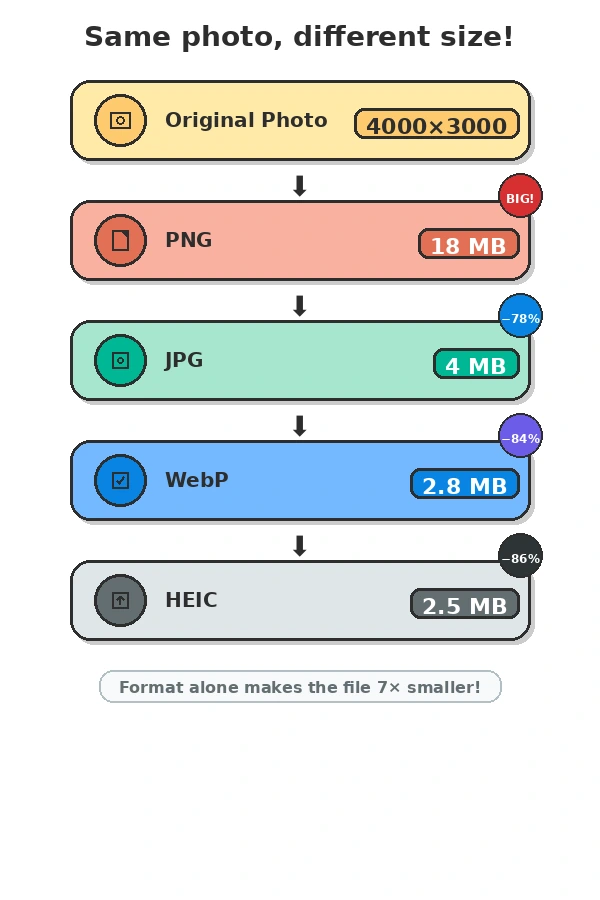
Quick answer: Image file size is the amount of storage an image occupies, measured in kilobytes (KB), megabytes (MB), or gigabytes (GB). It depends on image dimensions, compression level, file format, and metadata. Two images with the exact same pixel dimensions can have wildly different file sizes.
If you've ever seen "image max 10MB" or "file too large - must be under 2MB" and wondered why your photo looks fine but keeps getting rejected, this guide answers everything - including the questions you didn't know you had.
File Size vs. Image Dimensions: The Difference That Trips Everyone Up
These are two completely separate things describing the same image file.
| Property | File Size | Dimensions |
|---|---|---|
| Measured in | KB / MB / GB | Pixels (width x height) |
| Determines | Storage space, upload limits | How big the image looks on screen or in print |
| Upload limit check | Yes - "max 10MB" | Sometimes - "max 2000px wide" |
| Print quality | No | Yes - more pixels = sharper prints |
| Can change without the other | Yes | Yes |
Image dimensions tell you how many pixels wide and tall the image is. For example, "3000 x 2000 pixels" means the image is 3000 pixels across and 2000 pixels tall. Dimensions determine display size and print sharpness.
File size tells you how much storage space the image takes up. This is what upload forms check when they say "max 10MB."
Here's why this distinction matters: two photos with identical dimensions can have completely different file sizes depending on how they are compressed and which format they use. A 4000 x 3000 pixel photo saved as a high-quality JPG might be 5MB. The same photo saved as a lossless PNG might be 22MB. Same number of pixels - five times the file size.
What Do MB and KB Actually Mean?
The units work on a base-1024 system:
| Unit | Equal to | Typical image use |
|---|---|---|
| 1 KB (kilobyte) | 1,024 bytes | Very small icons, thumbnails |
| 1 MB (megabyte) | 1,024 KB = 1,048,576 bytes | Standard photos, web images |
| 1 GB (gigabyte) | 1,024 MB | Very large image collections |
So when an upload form says "max 10MB," it is setting a ceiling of approximately 10,485,760 bytes.
Real Test Data: Same Photo, Five Formats
We tested the same 4032 x 3024 smartphone photo (12.2 megapixels) across five common formats to show how dramatically file size changes:
| Format | Quality Setting | File Size | Notes |
|---|---|---|---|
| JPG | 100% (max quality) | 7.2 MB | Largest JPG, minimal compression artifacts |
| JPG | 85% (recommended) | 3.9 MB | Sweet spot - excellent quality, half the size |
| WebP | 85% | 2.8 MB | Best web format, ~25% smaller than JPG |
| HEIC | Default | 2.5 MB | iPhone default, excellent compression |
| PNG | Lossless | 18.4 MB | Preserves every pixel, 5x larger than JPG |
Key takeaway: Your choice of format matters more than almost anything else. Switching from PNG to WebP can shrink a file by 84% with zero visible quality loss.
The Simple Formula
File Size ≈ Pixels x Color Information x Compression
- Pixels - total pixel count (width x height). More pixels = more data.
- Color information - how many bits describe each pixel's color. 24-bit RGB (16.7 million colors) is standard; 32-bit adds transparency.
- Compression - the algorithm that squeezes data smaller. Lossy (JPG, WebP) discards invisible detail. Lossless (PNG) preserves everything.
What Affects Image File Size? (All 8 Factors)
Most guides mention two or three. Here are all the major factors:
| Factor | How it impacts size | Example |
|---|---|---|
| Resolution (pixel dimensions) | More pixels = more data | 8000x6000 vs 2000x1500 |
| Compression level | Higher compression = smaller file | JPG quality 60% vs 100% |
| File format | Different algorithms, different efficiency | PNG vs WebP |
| Color depth | More bits per pixel = larger file | 8-bit vs 24-bit vs 32-bit |
| Transparency | Alpha channel adds ~33% data | PNG with transparency vs without |
| Metadata | EXIF data (GPS, camera model, settings) | Can add 100-300KB |
| Image noise / complexity | Noisy photos compress poorly | Grainy night photo vs clean sky |
| Camera sensor quality | Higher-quality sensors capture more detail | 12MP phone vs 24MP DSLR |
Why Do Platforms Set File Size Limits?
Every platform has an engineering reason for the limit, even when it feels arbitrary:
- Storage cost: Platforms pay per gigabyte. Uncapped uploads would make image-heavy services financially unsustainable.
- Upload reliability: Larger files fail more often on slow mobile connections. A 50MB file that fails halfway through wastes the user's time and server resources.
- Processing speed: Many platforms auto-resize, compress, or analyze uploaded images. Larger originals take longer to process, adding latency to every upload.
- Display consistency: When platforms know all images are under a certain size, they can optimize their display pipeline. Allowing unlimited sizes would require handling extreme edge cases constantly.
10MB is a common ceiling because it comfortably holds a high-quality photograph that has been reasonably compressed - sharp enough for web display, printing at A5 or smaller, and manual review - without requiring uncompressed originals.
Common Upload Limits by Platform
People search these questions constantly. Here are the real limits:
| Platform | Typical Limit | Notes |
|---|---|---|
| Gmail | 25 MB per attachment | Includes all attachments in one email |
| Compresses automatically | Sends ~100-300KB regardless of original | |
| Discord (free) | 10 MB | Nitro users get 50-500 MB |
| ~8 MB for photos | Compresses aggressively | |
| Twitter/X | ~5 MB for images | Converts to JPG automatically |
| Government forms | 200 KB - 2 MB | Often strictest; check exact requirement |
| Job portals | 1-5 MB | Usually for profile photos or resumes |
| ~8 MB for profile photo | Recommends 400x400 px minimum | |
| WordPress default | 2 MB | Can be increased via settings |
| Shopify | 20 MB per image | Recommends 2048x2048 for products |
Quick Reference: Typical File Sizes
| Image type | Typical file size |
|---|---|
| 12MP smartphone photo (JPG, camera default) | 3-6 MB |
| 24MP DSLR photo (JPG, high quality) | 8-15 MB |
| 24MP DSLR photo (RAW format) | 25-45 MB |
| Screenshot of a website (PNG) | 200 KB - 2 MB |
| Logo with transparent background (PNG) | 50 KB - 500 KB |
| Product photo edited in Photoshop (PNG) | 5-20 MB |
| iPhone photo in HEIC format | 2-4 MB |
| Avatar/profile photo (JPG, 500x500) | 50-200 KB |
How to Check Your Image's Current File Size
- On Windows: Right-click the image file → Properties → Look at the "Size" field under the General tab.
- On Mac: Right-click the image → Get Info → Look at "Size" - note that Mac shows both the size on disk and the actual file size. Use the number in parentheses (the actual size).
- On iPhone: Open the Photos app → tap the photo → swipe up to see file details including file size (iOS 16 and later).
- On Android: Open your file manager app → navigate to the photo → tap and hold to see file properties including size.
How to Reduce File Size Without Changing Dimensions
If your image dimensions are already correct (for example, your photo is 4000 x 3000 pixels and that is what the platform requires) but the file is too large, you can reduce the file size using compression without touching the pixel count.
| Method | Typical reduction | Best for |
|---|---|---|
| Change format (PNG → JPG) | 60-80% smaller | Photos with no transparency |
| Increase compression (JPG quality 85%) | ~50% smaller vs 100% | Web display, social media |
| Remove metadata | 100-300 KB saved | Any photo with EXIF data |
| Convert to WebP | 25-35% smaller than JPG | Web use, modern browsers |
| Convert to AVIF | 30-50% smaller than JPG | Cutting-edge web optimization |
If you don't want to calculate compression settings manually, upload your image, choose a target file size (such as 200 KB, 2 MB, or 10 MB), and let the tool optimize the image while preserving as much quality as possible.
Myths vs. Facts
| Myth | Reality |
|---|---|
| More pixels always means a larger file. | Compression can make a higher-resolution JPG smaller than a lower-resolution PNG. A 6000x4000 JPG (quality 60%) can be smaller than a 2000x1500 PNG. |
| PNG is always better quality. | PNG is only better when you need transparency or lossless quality. For photographs, JPG/WebP at 85% quality is visually identical and 5x smaller. |
| Changing the file extension changes the size. | Renaming photo.png to photo.jpg changes nothing. The actual encoding must be converted. |
| Screenshots should be the same size as camera photos. | Screenshots contain fewer colors and compress extremely well. A 3000x2000 screenshot is often 200 KB; a camera photo of the same size is 4-6 MB. |
| HEIC is just Apple's version of JPG. | HEIC uses advanced compression (H.265 based) and is typically 30-50% smaller than JPG at the same quality. The trade-off is limited compatibility outside Apple ecosystems. |
FAQ: The Questions You're Actually Searching For
Does reducing pixels reduce file size?
Usually yes, but not always. Fewer pixels means less raw data to store. However, a 6000x4000 high-compression JPG can still be smaller than a 2000x1500 uncompressed PNG. Dimensions matter, but format and compression matter more.
Why is my 400 KB image still rejected?
The website may require more than just file size. Check for:
- Maximum width or height (e.g., "must be under 1200 px wide")
- Supported format (e.g., only JPG and PNG, no WebP or HEIC)
- Minimum dimensions (e.g., "must be at least 600x600 px")
- Aspect ratio (e.g., "must be 1:1 for profile photos")
Why is a 3000x2000 image only 500 KB?
Screenshots and simple graphics compress extremely well. A screenshot of a website has large areas of flat color, which compression algorithms love. A 3000x2000 photo of a forest has millions of unique colors and fine detail, making it 5-10x larger at the same dimensions.
Why is my PNG 25 MB?
PNG is a lossless format - it preserves every single pixel exactly. A 24MP photo (6000x4000 pixels) saved as PNG stores roughly 72 million bytes of raw color data, plus overhead. The same photo as JPG at 85% quality might be 4-6 MB. PNG is designed for graphics with transparency, not photographs.
Why is HEIC smaller than JPG?
HEIC (High Efficiency Image Container) uses H.265/HEVC compression, which is significantly more efficient than JPG's older algorithm. An iPhone HEIC photo is typically 30-50% smaller than the same photo as JPG at equivalent visual quality. The downside: many non-Apple platforms and older software don't support HEIC natively.
Why does WhatsApp reduce image size?
WhatsApp compresses every image to ~100-300 KB to save server storage, reduce data usage, and ensure fast delivery on slow connections. This is why photos sent via WhatsApp look noticeably softer than the original. For full quality, use "Document" instead of "Photo" when sending.
Does changing pixels reduce MB?
Yes - reducing dimensions reduces the total pixel count, which reduces the raw data. However, the relationship isn't perfectly linear. Halving both width and height (e.g., 4000x3000 → 2000x1500) quarters the pixel count, which typically quarters the file size at the same compression settings.
Which image format is best?
It depends on your use case. Here's the ranking by file size efficiency:
HEIC ≈ AVIF < WebP < JPG < PNG
| Format | Best for | Avoid when |
|---|---|---|
| HEIC | iPhone storage, Apple ecosystem | Sharing outside Apple, web uploads |
| AVIF | Maximum web compression | Older browser support needed |
| WebP | Modern web, best all-rounder | Legacy systems, some print workflows |
| JPG | Universal compatibility, photography | Transparency needed, repeated editing |
| PNG | Transparency, lossless quality, graphics | Photographs, file size matters |
Why won't my 2 MB image upload?
Check all requirements, not just file size:
- Dimensions - is it under the max width/height?
- Format - does the site accept your file type?
- File size - is it under the limit? (Some sites measure in binary MB, others in decimal)
- Color mode - some platforms require RGB, not CMYK
- File name - special characters in filenames can cause rejections
Is 1 MB a large image?
It depends. A 1 MB JPG at 4000x3000 pixels is impressively small (heavily compressed). A 1 MB PNG at 500x500 pixels is enormous (uncompressed or poorly optimized). Context - dimensions and format - matters more than the raw number.
Related Tools and Guides
Since you're on ImageResizerAI, here are the tools that solve the problems this article describes:
- Resize Image to 2MB - Perfect for government forms and job portals
- Resize Image to 10MB - Ideal for Discord, Shopify, and general uploads
Authoritative References
For technical accuracy, this article references the following specifications:
- JPEG Standard (ISO/IEC 10918-1)
- PNG Specification (W3C)
- WebP Documentation (Google)
- HEIF/HEIC Specification (MPEG)
Bottom Line
Image file size is not just about how many pixels you have - it's about how those pixels are encoded, compressed, and stored. The same 12-megapixel photo can be 18 MB or 2.5 MB depending on format alone. Understanding this distinction is the difference between rejected uploads and seamless submissions.
If you don't want to calculate compression settings manually, upload your image, choose a target file size (such as 200 KB, 2 MB, or 10 MB), and let the tool optimize the image while preserving as much quality as possible.